
A rent ledger template (also called a rental ledger template) is a ready to use spreadsheet for recording every rent charge, payment, late fee and balance for each rental unit. Ours is free, works in Excel and Google Sheets, is built for small landlords, and builds a year end summary grouped by IRS Schedule E line for your tax preparer.
The blank template, the filled in example and the fillable PDF are all free. Version 2.0 for the 2026 tax year. The Quick Start guide comes in the free Landlord Starter Kit.
Free bonus: the Landlord Starter Kit. Get the Quick Start guide and 5 printable forms (late rent notice, partial payment agreement, move in and out checklist, security deposit record and year end tax checklist) when you join our email list. Get the kit
What is a rent ledger?
A rent ledger is a running record of every rent charge and payment for one rental unit. Each row shows when rent was due, the amount due, any late fee, the amount paid, the date it was paid and the balance left. One look tells you who is paid up and who owes money.
Landlords use a rent ledger to:
- Spot late and partial payments the day they happen.
- Give a tenant or a housing authority a clear payment history.
- Back up the rental income you report on IRS Schedule E.
- Have a dated record of payments if a dispute ever reaches court.
You may also see it called a landlord ledger, rental ledger, rental property ledger, rent payment ledger or tenant ledger. A tenant ledger usually means one tenant’s history across the whole lease. See our tenant ledger guide for a filled in example.
What’s inside the template
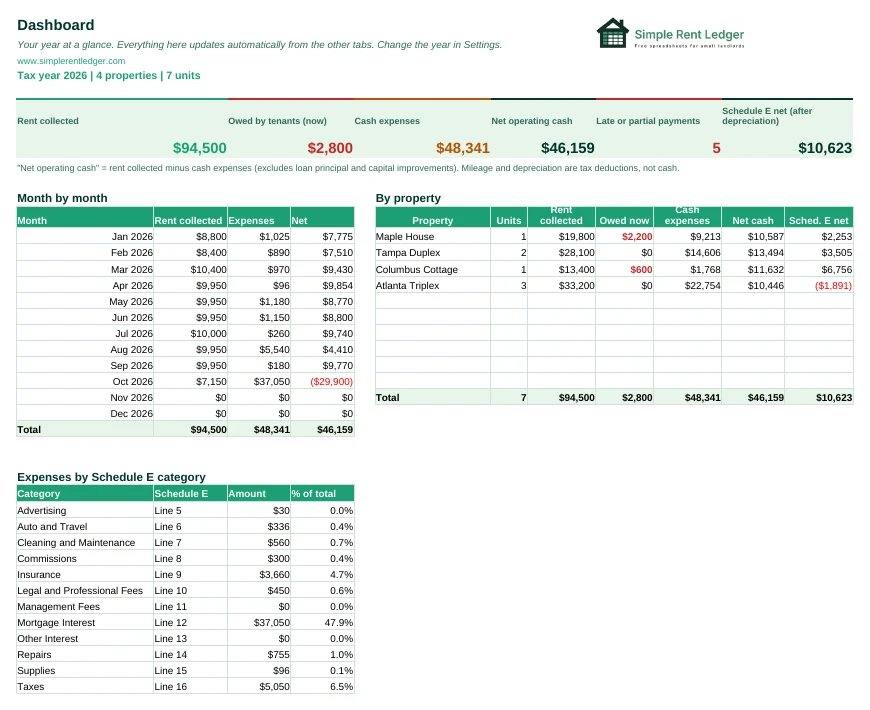
- Dashboard: rent collected, money owed, cash expenses and net cash flow, by month and by property.
- Settings: the tax year, the IRS mileage rates (2026 has two: 72.5 cents before July 1 and 76 cents from July 1) and your grace period, set once a year.
- Properties: each rental with its purchase details and a depreciation estimate.
- Tenants: units, tenants, lease dates and deposits, with a warning when a lease ends within 60 days.
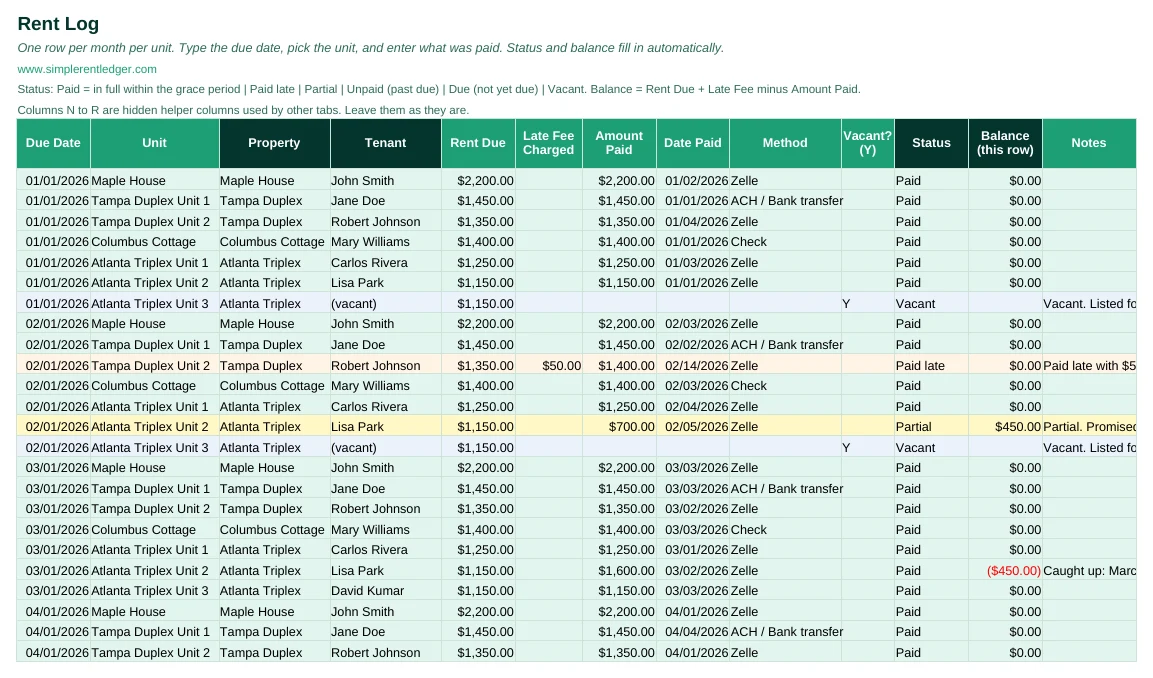
- Rent Log: one row per unit per month, with automatic Paid, Paid late, Partial, Unpaid, Due or Vacant status.
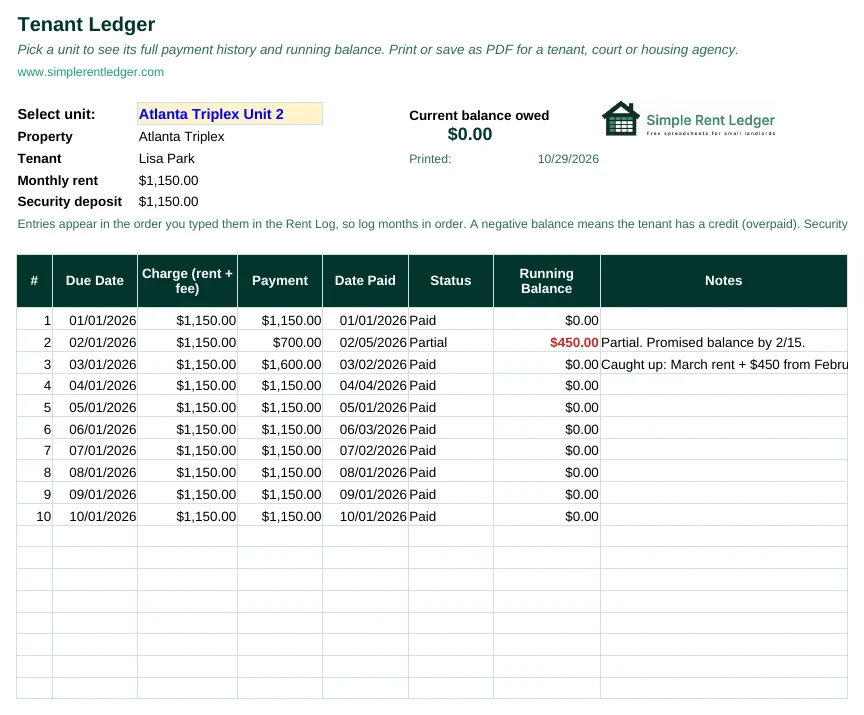
- Tenant Ledger: pick a unit and see its full payment history with a running balance, ready to print.
- Expenses and Mileage: every cost and business drive, sorted into Schedule E categories.
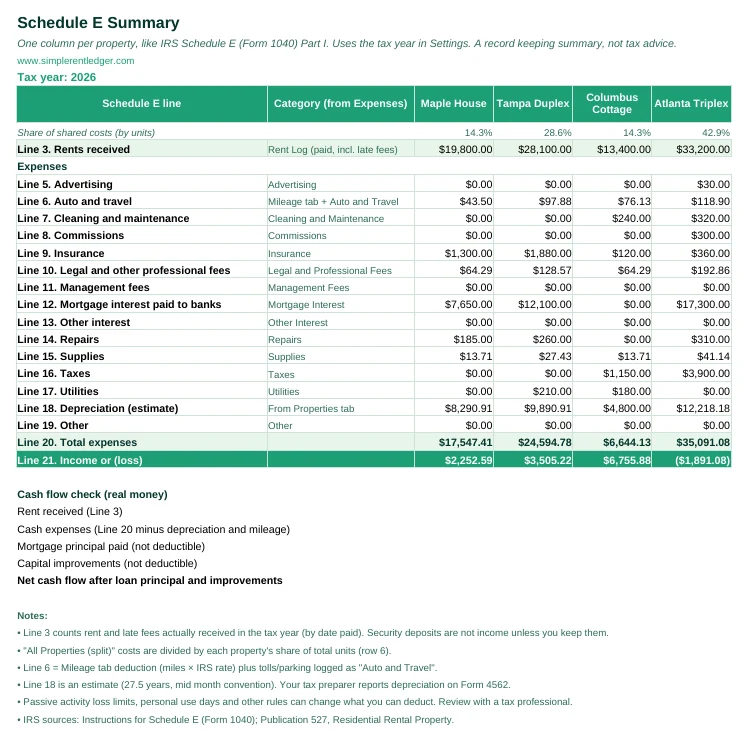
- Schedule E summary: one column per property, with every Schedule E line filled in from your records.
How to use it in 5 steps
- Open the file. Double click it to open in Excel, or in Google Sheets go to File, Import, Upload and choose the file.
- Check Settings. Confirm the tax year and the IRS mileage rates. Update both every January.
- Add your properties and units. Enter each property once on the Properties tab, then one row per unit on the Tenants tab.
- Log rent every month. On the Rent Log, add the due date, pick the unit and type what was paid. Status and balance fill in by themselves.
- Log expenses and drives. Pick the property and the category. The Dashboard and Schedule E tabs update automatically.
Rent ledger example (filled in sample)
Here is a sample rent ledger, also called a rental ledger, for one tenant over three months. It shows the payment on time, the late payment with a $50 fee, and the partial payment that leaves $400 owed.
| Due date | Rent due | Late fee | Amount paid | Date paid | Status | Running balance |
|---|---|---|---|---|---|---|
| 01/01/2026 | $1,200 | $0 | $1,200 | 01/03/2026 | Paid | $0 |
| 02/01/2026 | $1,200 | $50 | $1,250 | 02/12/2026 | Paid late | $0 |
| 03/01/2026 | $1,200 | $0 | $800 | 03/04/2026 | Partial | $400 |
Want to see a whole year filled in? Download the filled in example (.xlsx). It opens in Excel and Google Sheets.
State rules to know when you keep a rent ledger
No state makes you use a ledger, but a few state laws decide what your ledger has to show. Here are the ones small landlords ask about most. Rules change, so check the law for your state and city.
- Rent receipts. In New York, you must give a written receipt for rent paid in cash, by money order or by any way other than the tenant’s personal check, and keep a record of cash payments for three years (Real Property Law 235-e). In Texas, you must give a written receipt for cash rent and enter the date and amount in a record book (Property Code 92.011). In California, a tenant can ask for a written receipt for any payment (Code of Civil Procedure 2075). Our rent receipt template matches the ledger columns.
- Late fees. Some states cap them. New York: no fee until rent is more than 5 days late, then the lesser of $50 or 5% of monthly rent (RPL 238-a). Texas: no fee until rent is unpaid more than 2 full days, and a fee up to 12% of monthly rent is presumed reasonable for buildings with 4 or fewer units (Property Code 92.019). Maine: up to 4% of monthly rent, only after 15 days (14 M.R.S. 6028). Massachusetts: no late fee or interest until rent is 30 days late (c.186 §15B). Many states set no number, but the fee must be in your lease. Record each fee on its own line, as in the example above. See late rent fee rules.
- Security deposits. Some states have strict deposit rules, for example Massachusetts (our guide). Track deposits apart from rent with the security deposit tracker.
- How long to keep the ledger. For taxes, the IRS says to keep records for at least 3 years after you file the return they support, and to keep property records until the limit runs out for the year you sell the property (IRS: How long should I keep records?). New York’s cash receipt rule above also asks for 3 years.
State guides: California, Texas, Florida, New York.
Year end Schedule E summary
At tax time, the Schedule E tab gives your tax preparer rents received and every expense line for each property, plus an estimate of depreciation. It is a record keeping summary.
Related free forms for your rent records
- Rent receipt template: give the tenant proof of each payment
- Late rent notice: a friendly reminder when rent is late
- Partial rent payment: how to record and handle a short payment
- Rent increase letter: notice of a new rent amount
- Lease addendum: put a change to the lease in writing
- Rental property balance sheet: what the rental owns and owes, in Excel
Comparing landlord apps? See Stessa vs TurboTenant vs Baselane vs a spreadsheet.
New to renting out a property? Start with our first time landlord checklist, from local rules and insurance to the lease and rent records.
Need a one page summary of all your units? A rent ledger tracks each tenant over time. For a snapshot of every unit on one date, use our free rent roll template.
Watch: how to keep a rent ledger

 Simple Rent LedgerFree landlord tutorials on YouTube
Frequently asked questions
Is there a free rent ledger template?
Yes. Download the blank template and use it for your own rental properties at no cost. The filled in example is free to download too. The Quick Start guide comes in the free Landlord Starter Kit for email subscribers.
Is a rental ledger template the same as a rent ledger template?
Yes. Rental ledger, rent ledger and rent payment ledger are different names for the same record: rent due, payments, late fees and the balance for each unit. This template works for all of them. If you want to see one filled in first, look at the sample rent ledger above.
Is there a printable rent ledger?
Yes. Download the fillable PDF or the Word version. You can type into it on your computer, or print it and fill it in by hand. It fits one US Letter page, with a row for each month, a year totals row and space for the deposit, late fee and grace period. Print one page per unit per year.
Does it work in Google Sheets and Excel?
Yes. It opens in Microsoft Excel, and you can import it into Google Sheets with File, Import, Upload. All formulas work in both.
How many units can it track?
It is built for small landlords, and it has room for up to 10 properties and 30 units.
How does it handle late fees and partial payments?
Type the late fee you charged and the amount paid. The status changes to Paid late or Partial on its own, and the balance shows what is still owed.
Can I give the ledger to my tenant or a housing agency?
Yes. Open the Tenant Ledger tab, pick the unit, and print it or save it as a PDF. Check the entries before you share them.
What is the difference between a rent ledger and a tenant ledger?
People often use the two names for the same record. A tenant ledger is usually the payment history for one tenant, while a rent ledger can cover every unit you own. This template covers up to 4 units. For one tenant’s history, see our tenant ledger guide.
Can I use the Schedule E summary for my taxes?
Yes, as an organized record: it groups your rent and expenses by Schedule E line so you or your tax preparer can fill in the return faster. Check the official rules in IRS Publication 527.
How long should a landlord keep rental records?
The IRS generally says to keep tax records for 3 years after you file the return, or 6 years if you left out more than 25% of your income. Keep records about the property itself, such as the purchase, improvements and depreciation, until the period of limitations ends for the year you sell it. Many landlords keep each rent ledger for the whole tenancy plus at least 3 years. Source: IRS: How long should I keep records?.
What is a landlord ledger?
It is another name for a rent ledger: one record of what each tenant owes and pays, month by month, with a running balance. For a one page summary of all your units on one date, use a rent roll instead.
Need help? Contact us and we will be happy to answer.